Thursday, 7 August 2014

Lesson 26

FINAL POST

All at once, we are at the last post of this blog. It has been a great time documenting my experiences. This lesson, like the lesson before, we worked on our group project. I'm almost done with everything, and it feels really good seeing the fruit of my hard work come to life. I feel like a proud dad of my baby magazine page hahaha. With the advice of our tutor, I was able to correct and improve my work to make it as good as it looks now. Here it is, my pride and joy:


There might be a few slight adjustments here and there, but other than that, my work here is done. With a heavy heart, I shall sign off for the last time :)

This is it for this blog. I thank you from the bottom of my heart for taking the time to bear through its good and its bad. Thank you.


Lesson 25

Putting the pieces together

In this lesson, I spent my time putting my pictures and background together in InDesign, trying my best to to fit them in neatly and nicely. I also searched for a relevant story to put as my text. My magazine pages are taking space, and soon I will have my text up and going as well. Here is my progress till now. It's not that much yet, but with effort, I will make it happen. 


I will continue working on it to make it better. 

This is it for this post. Thank you!

Sunday, 3 August 2014

Lesson 24

Group Project

In this lesson, we worked on our group project. I was able to get a cool looking back ground, basketball player and basketball hoop to put in my magazine pages. Using photoshop, I edited and enhanced the images so that would fit together in the magazine. For example, I changed the brightness of the background and did a few other adjustments to make it more fitting. I also cropped the basketball player out of the background and did some adjustments to its brightness and other minor changes. Here are the different images I have to put in place altogether: 


I had trouble cropping my images to the focus and sizes that I wanted, but I persevered and got what I wanted in the end.

This is it for this post. Thank you!

Lesson 23

The Absence

In this lesson.. Well I was actually absent for this lesson because I had a 5-day MC from a teeth sugery. But nevertheless, I asked my classmates about what they did for class and I heard that they worked on their group project. I haven't done much since our tutor approved my group's grids, but once I'm all well and fit again I'll definitely work well and hard on my magazine pages. Here is the draft that I have that will be my guide: 


This is it for this post. Thanks!

Monday, 28 July 2014

Lesson 22


Creating a book

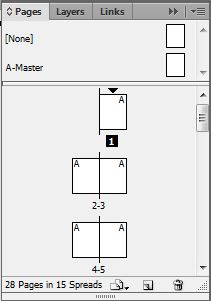
In this lesson, we learnt how to create a book file with InDesign. We need to know this in order to compile the pages of our magazine together into one file for our group project. Here is an example of pages coming together to form a book in InDesign:


We also continued to work on our group project. We finalised our layout on the star grid and checked with our tutor to see if he approved it. He did! He then gave us the star grid in softcopy so that we will be able to start working on our magazine. I felt quite accomplished as my group was one of the first to have our designs approved by Mr Cheo and given the grid. Now, time to start figuring out how to put everything in place in InDesign!

Thank you!

Tuesday, 22 July 2014

Lesson 21

Para & Chara Styles

In this lesson, we learnt more on InDesign, namely on how to make use of Paragraph and Character Style. With this, we will be able to make our paragraphs and words look the way we want them to look- neat, orderly, some of them standing out to catch attention. Here is one of the product of the exercise I did to experiment with the styles: 


Here is an exercise we did on our own to test our abilities. This was actually quite hard and I took a long time to do it, but I after I completed it I felt extremely accomplished! I feel it looks quite good, as good as the example given, don't you think? Hahahaha


Thank you!

Lesson 20

More InDesign

In this lesson, we continued with our practice of InDesign. This are my products:


This one was done under the guidance of our tutor

This one was done by ourselves

We also discussed about our grids for the assignment. Mine was a star grid, as mentioned, and my tutor gave me some tips on how I might improve on the elements' placement. My grid is really simple, but I like it as it still has alot of places where I can add in more texts and pictures which can fit in nicely with the rest of the page.

Thank you!